

CO-163 means your claim promised the payer some paperwork, and the paperwork never arrived. On an electronic claim that promise is the PWK segment: a report type, a way of sending it and an attachment control number. The payer holds the claim waiting for a document with that number. When nothing matches, it denies with CARC 163. The fix is almost always about matching: the right document, the right control number, the right address. (Primary source: X12 Claim Adjustment Reason Codes)
In brief: CARC 163 reads “Attachment/other documentation referenced on the claim was not received.” Check what the claim said you’d send, confirm it was sent with the same attachment control number, and resend it with a cover sheet. If the claim didn’t need an attachment, correct the claim to remove the PWK reference.
Part of our denial codes library. Written by Manikandan J, CPC, CRCR, who has managed attachment workflows for surgical and DME billing teams. Published 22 October 2026. Last updated: 22 October 2026. Code wording quoted word for word from X12.
Official CARC 163 description
| Field | X12 text |
|---|---|
| Code | 163 |
| Description | “Attachment/other documentation referenced on the claim was not received.” |
| Start | 06/30/2004 |
| Last modified | 06/02/2013 |
Source: X12 Claim Adjustment Reason Codes, checked 22 October 2026.
Key terms behind CARC 163
The PWK segment is the part of an 837 claim that says paperwork supports it. It carries a report type code (what the document is, such as an operative note) and a transmission code (how it’s coming, such as fax or mail). The attachment control number is the ID that links the document to the claim. On the paper CMS-1500, the NUCC instructions put the same details in Item 19 after the qualifier PWK.
CMS’s Medicare claims processing manual chapters describe how contractors handle claims and supporting documents for Medicare.
Why CARC 163 happens
- The document was never sent. For example, the PWK went out on the claim but no one faxed the note.
- The control number didn’t match. The cover sheet had a different number from the one on the claim.
- It went to the wrong place. The payer has a specific fax line or portal for attachments.
- The PWK was added by mistake. A template or charge rule added a PWK reference to claims that didn’t need one.
Example scenario (fictional names), part 1
CO-163 Denial Example: What Happened
Kenji Mori bills for Northfield Surgical Associates. An excision of a 3.2 cm benign lesion of the back (11406, D23.5) went to Granite Peak Health, a fictional plan, with a PWK segment saying the operative report would come by fax. The scheduler had faxed the report the same afternoon.
Three weeks later the 835 showed CAS*CO*163 with remark LQ*HE*N706, “Missing documentation.” Kenji pulled the fax log. The fax went through, but the cover sheet showed a control number that ended in 18, while the claim said 81.
Was the report lost, or did the payer just fail to match it? Keep reading, or jump to how the CO-163 denial was resolved.
Remark codes often paired with CARC 163
| RARC | X12 wording | What it tells you |
|---|---|---|
| N706 | “Missing documentation.” | The expected document isn’t on file |
| N463 | “Missing support data for claim.” | Supporting data never matched the claim |
| N454 | “Incomplete/invalid Consultation Report.” | A document arrived but wasn’t usable |
See the X12 RARC list for the full set.
How to fix a CO-163 denial
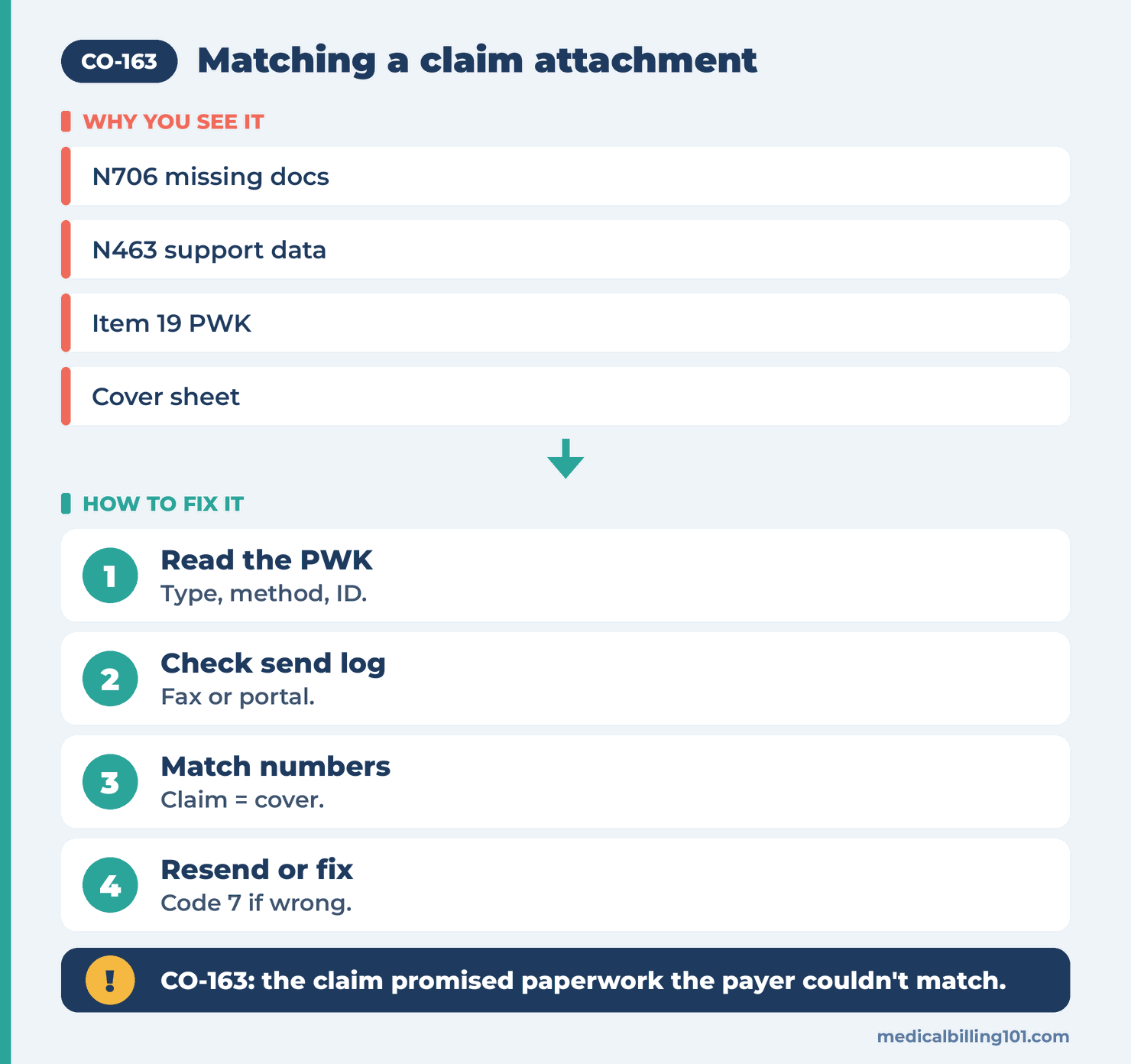
- Read the claim’s PWK details. Note the report type, transmission method and attachment control number.
- Check the send log. Confirm the document went out, when, and to which fax number, portal or address.
- Match the numbers. The control number on the cover sheet or portal upload must match the claim exactly.
- Resend correctly. Use the payer’s attachment cover sheet, the claim number and the matching control number.
- If the attachment wasn’t needed, send a corrected claim with frequency code 7 that removes the PWK reference.
- Ask for reprocessing once the payer confirms receipt. Some payers reopen on their own; others need a call or portal request.
Example scenario (fictional names), part 2
How the CO-163 Denial Was Resolved
Kenji compared the claim and the cover sheet. The scheduler had typed the control number by hand and swapped two digits. The payer had the report but couldn’t link it to the claim.
Fix: Kenji sent a corrected claim with Box 22 resubmission code 7 and the original claim number, and re-entered the PWK details in Box 19 so they matched the new cover sheet: OB (operative note), FX (fax) and the control number. He faxed the report again with that number on the cover sheet.
Outcome: Granite Peak matched the report and paid the line. Northfield switched to printing cover sheets straight from the billing system so no one types control numbers again.
Names and details are illustrative; no real patient data.
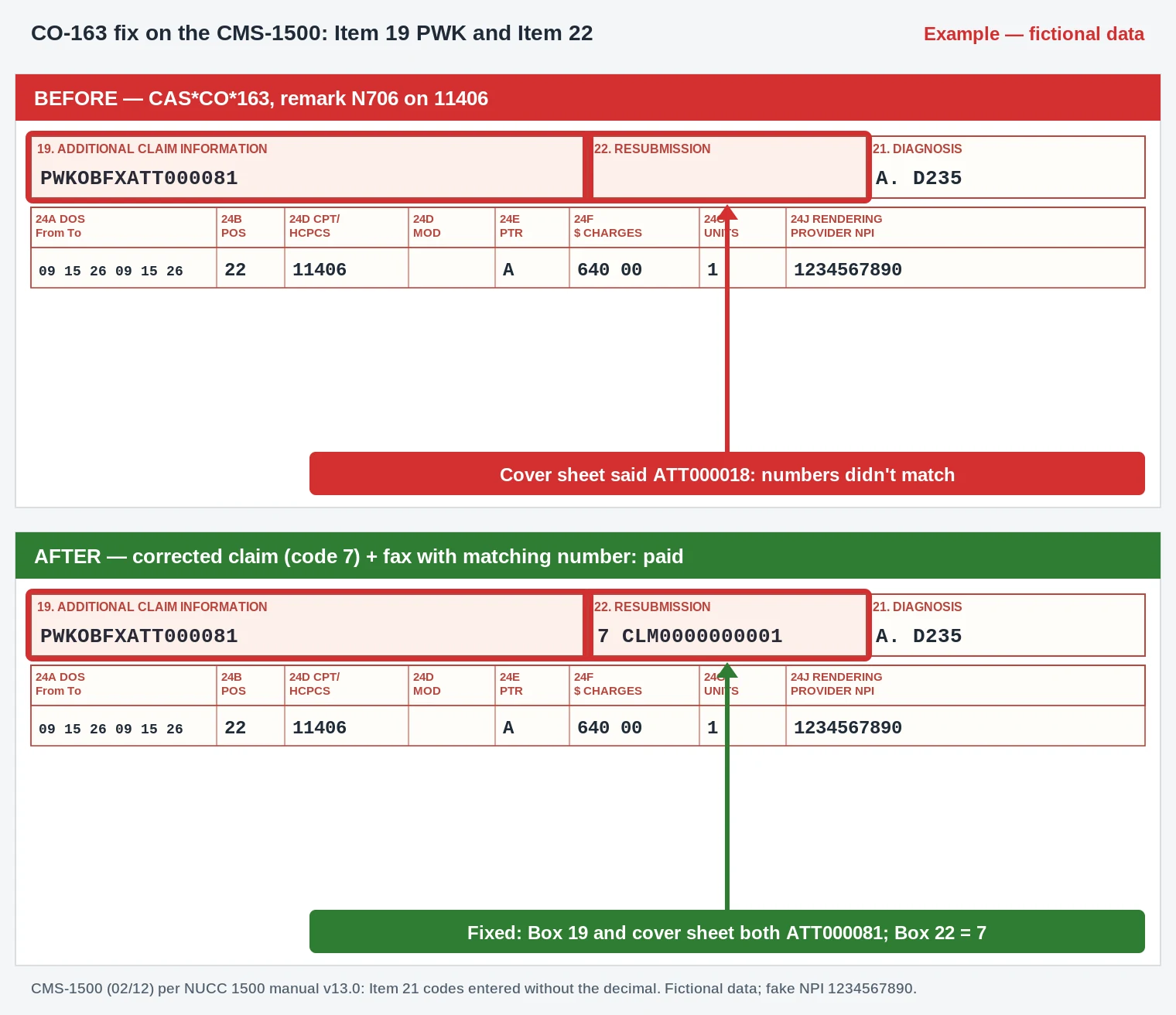
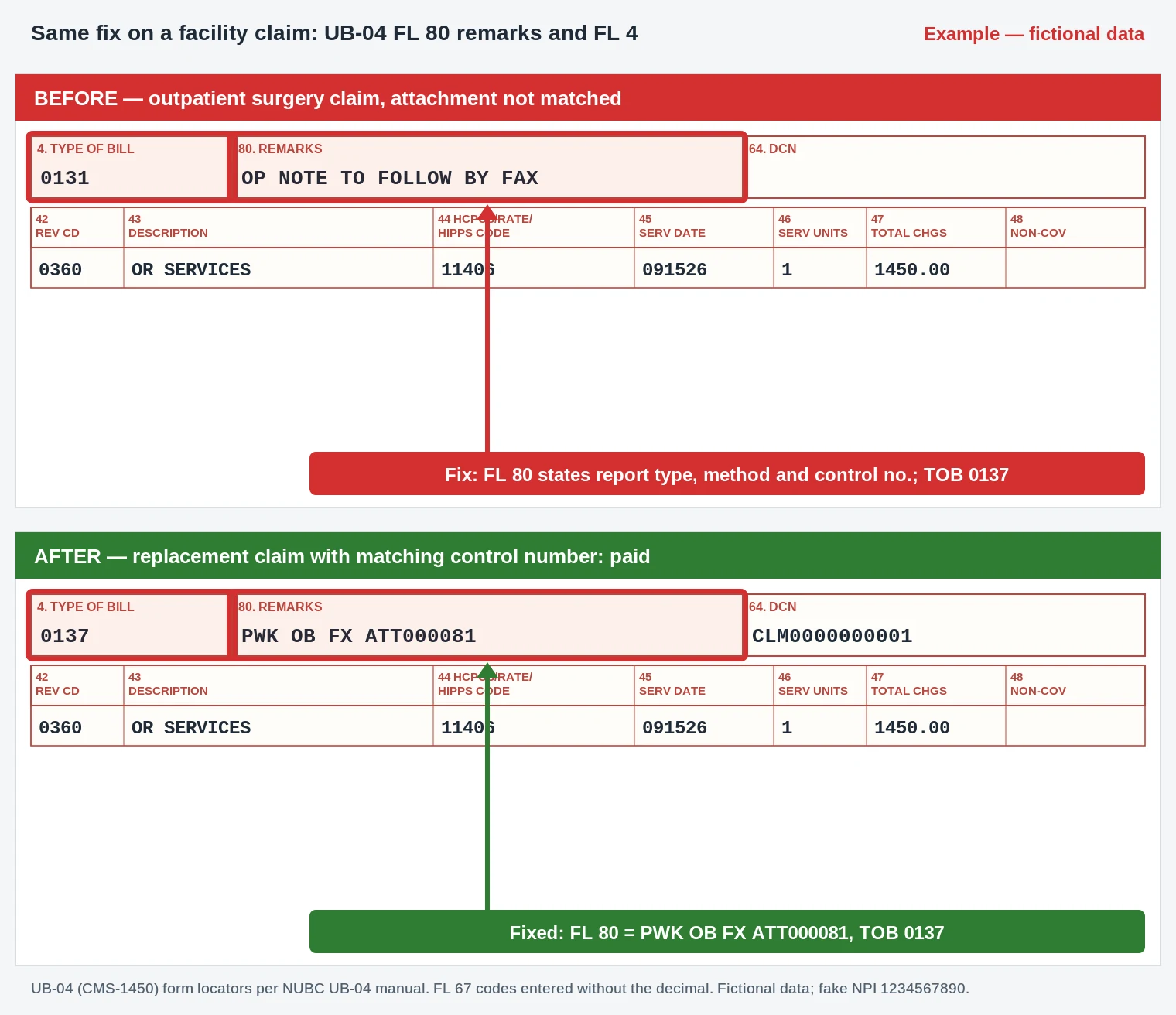
- Box 19 / FL 80: PWK, report type OB (operative note), transmission FX (fax) and attachment control number ATT000081, matching the cover sheet exactly.
- Cover sheet: reprinted from the billing system so the control number can’t be mistyped (the first fax said ATT000018).
- Box 22 / FL 4 + FL 64: resubmission code 7 with the original claim number (type of bill 0137).
- Box 24D / FL 44: 11406 with D23.5 (entered as D235) is unchanged.
Worked example (illustrative)
A DME supplier bills a power wheelchair with a PWK saying the certificate of medical necessity will be uploaded to the payer portal. The upload fails because the file is too large, and nobody notices. The claim denies with CARC 163. The supplier splits the file, uploads it with the same control number and asks the payer to reopen. If the payer’s timely rules for attachments have passed, a new claim may be needed. That is where CARC 164 can show up instead.
CO-163 vs similar codes
| Code | What it means | Main difference |
|---|---|---|
| CO-163 | Attachment referenced on the claim not received | Nothing arrived or matched |
| CO-164 | Attachment not received in a timely fashion | It arrived, but too late |
| CO-16 | Claim lacks information or has billing errors | Missing data on the claim itself |
| CO-252 | An attachment or other documentation is required | Payer asks for documents the claim didn’t mention |
Prevention checklist
- Cover sheets print from the billing system with the claim’s control number.
- Each payer’s attachment fax line or portal is saved in payer setup.
- Charge rules that add PWK are reviewed so they fire only when needed.
- A daily report lists claims with PWK and no matching send log.
Recap
CO-163 means the payer never matched the attachment your claim referenced. Check the PWK details, confirm the document was sent, make sure the control numbers match, and resend with the right cover sheet. If no attachment was needed, correct the claim to remove the PWK.
FAQ
What does denial code CO-163 mean?
The payer didn’t receive the attachment or documentation your claim said would be sent.
What is a PWK segment?
It’s the part of an electronic claim that says paperwork supports it, with a report type, transmission method and control number.
Where does PWK go on a paper CMS-1500?
In Item 19, after the qualifier PWK, per the NUCC instructions.
Do I need a new claim for CO-163?
Not always. Many payers reprocess once the attachment arrives with the right number. Send a corrected claim if the PWK details were wrong.
Can I bill the patient for CO-163?
No. It’s a CO denial for missing paperwork, not patient responsibility.
How is CO-163 different from CO-164?
CO-163 means nothing was received. CO-164 means it arrived after the payer’s deadline.
Sources
How we checked: each code quote on this page was matched word for word with the X12 CARC and RARC lists on 22 October 2026.
- X12, Claim Adjustment Reason Codes (CARC 163, 164, 16, 252). Accessed 22 Oct 2026.
- X12, Remittance Advice Remark Codes (N706, N463, N454). Accessed 22 Oct 2026.
- NUCC, 1500 claim form instructions (Item 19). Accessed 22 Oct 2026.
- CMS, Medicare Claims Processing Manual. Accessed 22 Oct 2026.
Last updated: 22 October 2026 · Educational content; not legal advice.