

CO-173 is an ordering problem. The plan pays for this service or equipment only when a physician (or another prescriber the plan accepts) ordered it, and the claim doesn’t show one. Suppliers of durable medical equipment, diabetic supplies, orthotics and home services see it most. Sometimes there really was no valid order. More often the order exists, but the claim named the wrong person as the ordering provider, or left the field blank. (Primary source: X12 Claim Adjustment Reason Codes)
In brief: CARC 173 reads “Service/equipment was not prescribed by a physician.” Check who signed the order and whether the plan accepts that type of prescriber. If a valid prescriber signed it, put that provider in Box 17 and 17b and send a corrected claim. If not, get a valid order before you bill again.
Part of our denial codes library. Written by Manikandan J, CPC, CRCR, who has built order intake checks for DME and home medical suppliers. Published 22 October 2026. Last updated: 22 October 2026. Code wording quoted word for word from X12.
Official CARC 173 description
| Field | X12 text |
|---|---|
| Code | 173 |
| Description | “Service/equipment was not prescribed by a physician.” |
| Start | 06/30/2005 |
| Last modified | 07/01/2013 |
Source: X12 Claim Adjustment Reason Codes, checked 22 October 2026.
Key terms behind CARC 173
An ordering provider is the clinician who prescribed the service or item. On the CMS-1500 that’s Box 17 (name, with qualifier DK) and Box 17b (NPI), per the NUCC instructions. A standard written order is the signed order a supplier keeps on file before billing. A qualified prescriber is anyone the plan accepts as able to order the item, which may include nurse practitioners and physician assistants under state law.
CMS’s NPPES NPI Registry lets you confirm the ordering provider’s NPI and type before you bill.
Common causes of CO-173
- The order was signed by someone who can’t prescribe. For example, a diabetes educator or a nurse without prescribing authority signed the form.
- Box 17 named the wrong person. The claim listed the clinic or the educator instead of the physician who signed.
- Box 17 was blank. The billing system didn’t carry the ordering provider onto the claim.
- The plan limits prescribers. Some plans accept only physicians for certain items, even where state law allows others.
Example scenario (fictional names), part 1
CO-173 Denial Example: What Happened
Hannah Brooks runs billing at Northpoint Medical Supply. A patient with type 2 diabetes on insulin (E11.65) got a 90-day supply of test strips (A4253) and lancets (A4259). The order form came from a diabetes education center, and intake entered the educator’s name in Box 17.
Oakridge Health, a fictional commercial plan, returned the claim with CAS*CO*173 on both lines and remark LQ*HE*N264, “Missing/incomplete/invalid ordering provider name.” The physician’s signature was on page two of the order form.
Did Northpoint need a new order, or just a corrected claim? Keep reading, or jump to how the CO-173 denial was resolved.
Remark codes often paired with CARC 173
| RARC | X12 wording | What it tells you |
|---|---|---|
| N264 | “Missing/incomplete/invalid ordering provider name.” | Box 17 name problem |
| N265 | “Missing/incomplete/invalid ordering provider primary identifier.” | Box 17b NPI problem |
| N574 | “Our records indicate the ordering/referring provider is of a type/specialty that cannot order or refer. Please verify that the claim ordering/referring provider information is accurate or contact the ordering/referring provider.” | The prescriber type isn’t accepted |
See the X12 RARC list for the full set.
How to fix a CO-173 denial
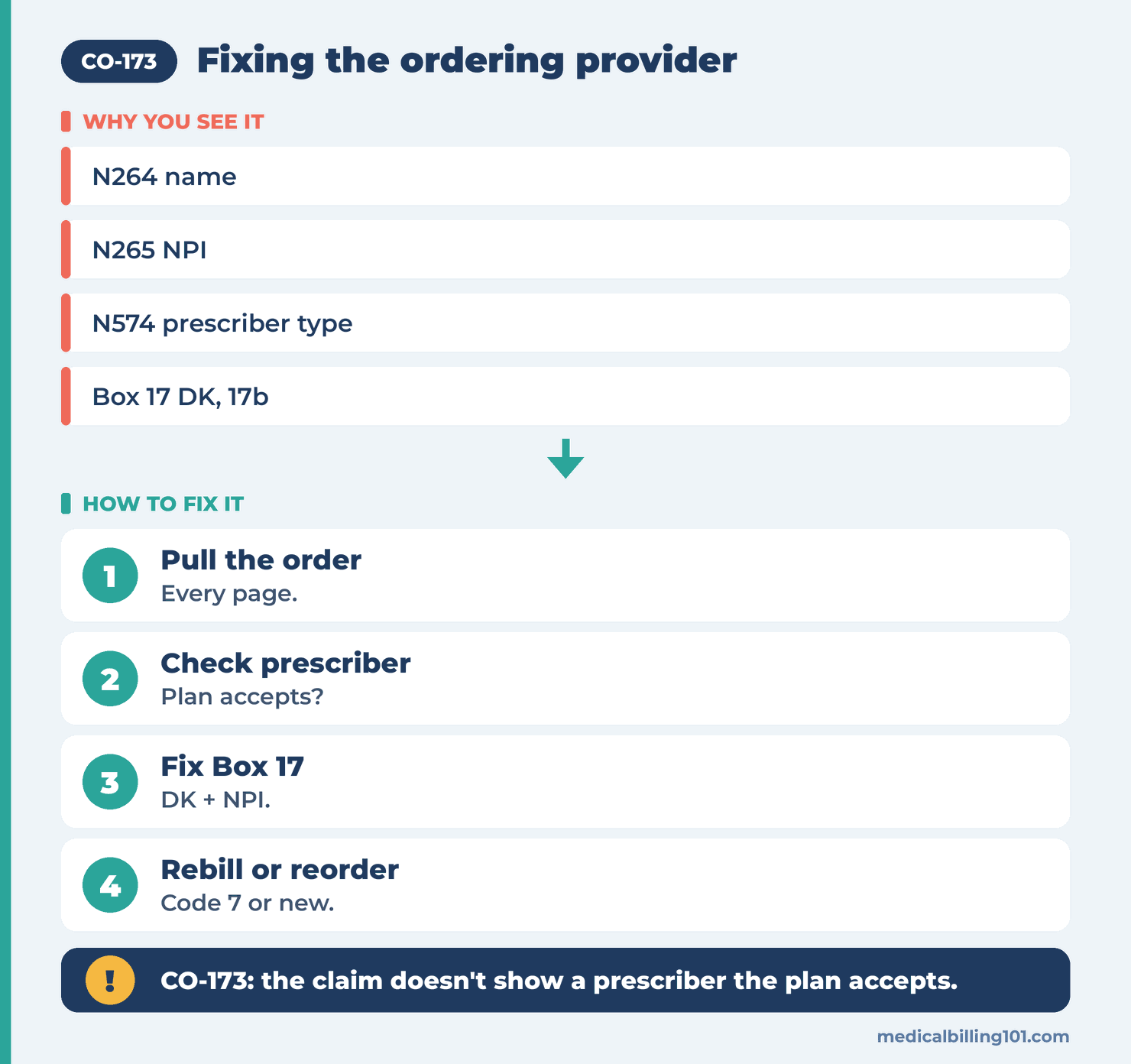
- Pull the order. Read every page. Note who signed it, their credential and the date.
- Check the prescriber type. Confirm the plan accepts that type of clinician for this item.
- Check the claim. Box 17 should show the prescriber’s name with qualifier DK, and Box 17b their NPI.
- If the order is valid, send a corrected claim with frequency code 7, the original claim number and the right ordering provider.
- If the order isn’t valid, get a new order from a qualified prescriber before you bill. Items delivered without one may not be payable.
- Fix intake. Make intake capture the prescriber from the signature line, not the form’s letterhead.
Example scenario (fictional names), part 2
How the CO-173 Denial Was Resolved
Hannah read page two of the order. Dr. Linda Okoye, the patient’s endocrinologist, had signed it, and the educator’s name was only on the letterhead. Oakridge accepts physicians for diabetic supplies, and Dr. Okoye’s NPI checked out in NPPES.
Fix: Hannah sent a corrected claim with Box 22 resubmission code 7 and the original claim number. Box 17 now showed DK and Dr. Okoye’s name, with her NPI in Box 17b.
Outcome: Oakridge paid both lines. Northpoint added a step to intake: the ordering provider must be taken from the signature, and intake staff confirm the NPI before the order is released for delivery.
Names and details are illustrative; no real patient data.
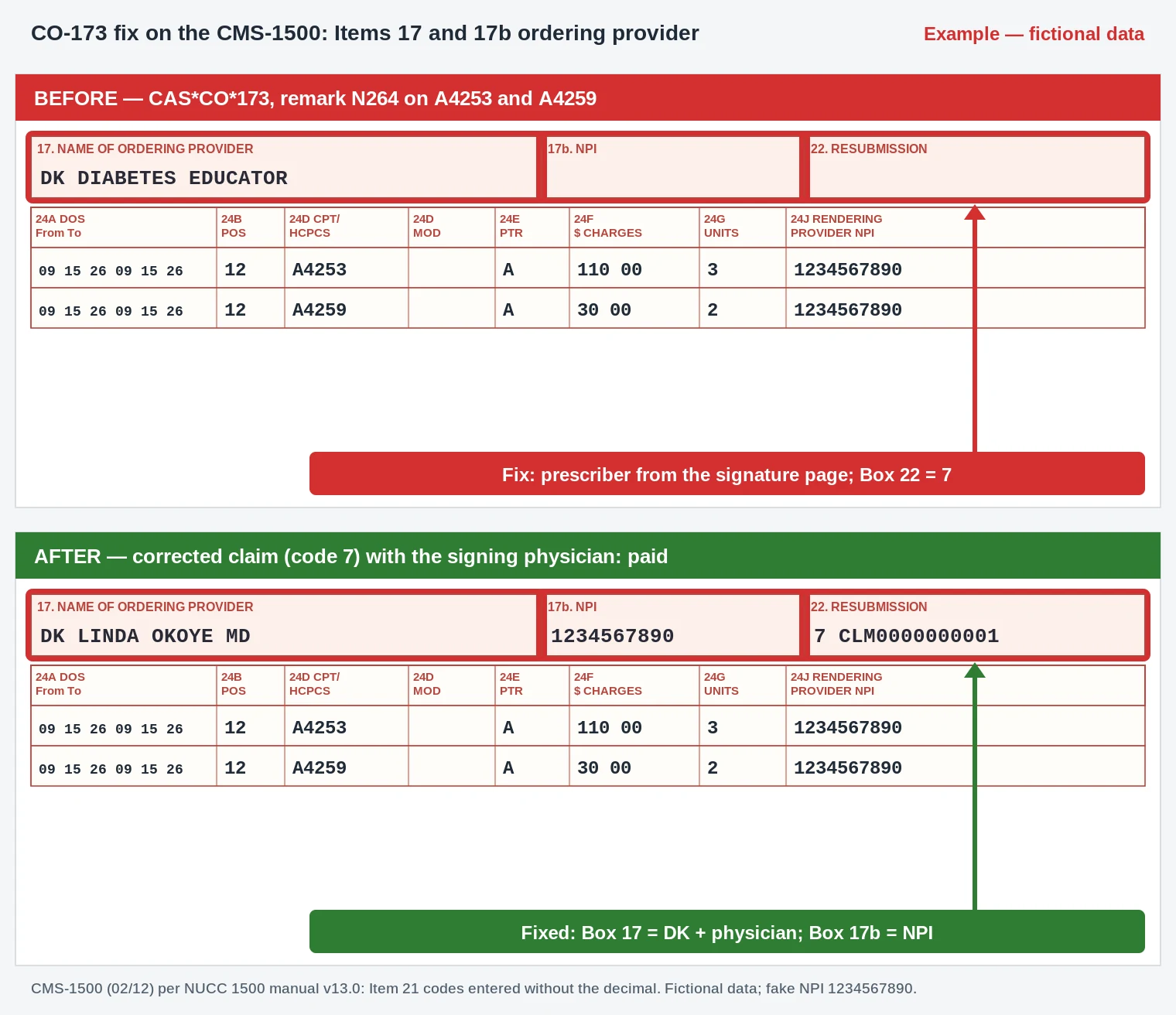
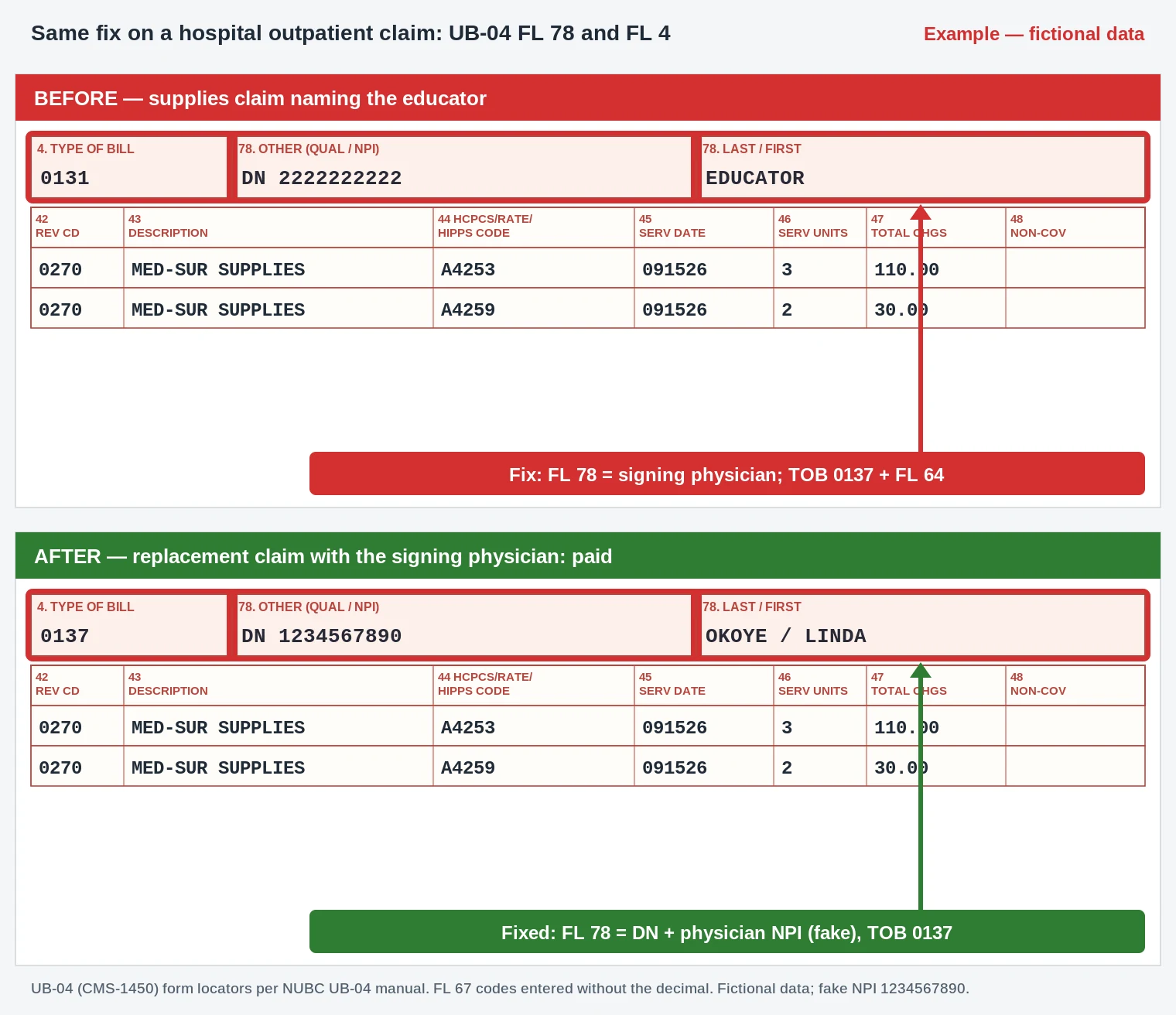
- Box 17: qualifier DK (ordering provider) with the physician who signed page two of the order, replacing the educator from the letterhead.
- Box 17b: the physician’s NPI, checked in NPPES (fake NPI shown).
- Box 22: resubmission code 7 with the original claim number.
- Box 24D / 24G: A4253 x3 and A4259 x2 with E11.65 (entered as E1165) are unchanged.
- UB-04 (hospital outpatient): FL 78 qualifier DN with the signing physician’s name and NPI; type of bill 0137.
Worked example (illustrative)
A physical therapist recommends a lumbar brace and gives the patient a note on clinic letterhead. The patient takes it to an orthotics supplier, which fits the brace and bills the plan with the therapist in Box 17. The plan denies with CO-173 because therapists can’t prescribe braces under its policy. The supplier contacts the patient’s physician, who examines the patient and signs an order. The supplier can then bill, but only for a date of service on or after the valid order.
CO-173 vs similar codes
| Code | What it means | Main difference |
|---|---|---|
| CO-173 | Not prescribed by a physician | Wrong or missing prescriber |
| CO-174 | Not prescribed prior to delivery | Order dated after delivery |
| CO-175 | Prescription is incomplete | Order missing required elements |
| CO-176 | Prescription is not current | Order has expired |
| CO-16 | Claim lacks information or has billing errors | General missing data |
Intake checklist
- Prescriber name and NPI come from the signature, not the letterhead.
- Prescriber type is checked against the plan’s rules.
- Box 17 uses qualifier DK for the ordering provider.
- Orders are complete and signed before delivery.
Recap
CO-173 means the claim doesn’t show a physician or accepted prescriber for the service or item. Read the whole order, check who signed it and whether the plan accepts them, then fix Box 17 and 17b on a corrected claim. If there’s no valid order, get one before you bill.
FAQ
What does denial code CO-173 mean?
The plan says the service or equipment wasn’t prescribed by a physician or another prescriber it accepts.
Can a nurse practitioner’s order fix CO-173?
Often yes, if the plan and state law accept nurse practitioners as prescribers for that item. Check the plan’s policy.
Where does the ordering provider go on the CMS-1500?
Box 17 with qualifier DK and the name, and Box 17b with the NPI.
Can I bill the patient for CO-173?
No. It’s a CO denial tied to ordering requirements.
Do I need a new order for CO-173?
Only if the existing order wasn’t signed by an accepted prescriber. If it was, a corrected claim is enough.
What remark codes come with CO-173?
Often N264 or N265 for the ordering provider name or NPI, or N574 when the prescriber type isn’t accepted.
Sources
How we checked: each code quote on this page was matched word for word with the X12 CARC and RARC lists on 22 October 2026.
- X12, Claim Adjustment Reason Codes (CARC 173 to 176, 16). Accessed 22 Oct 2026.
- X12, Remittance Advice Remark Codes (N264, N265, N574). Accessed 22 Oct 2026.
- NUCC, 1500 claim form instructions (Items 17 and 17b). Accessed 22 Oct 2026.
- CMS, NPPES NPI Registry. Accessed 22 Oct 2026.
Last updated: 22 October 2026 · Educational content; not legal advice.