
This RVU calculator shows the 2026 Medicare relative value units and the estimated payment for any CPT or HCPCS code on the physician fee schedule. Enter the code, pick your Medicare locality and the setting, and it applies the official CMS formula and conversion factor.
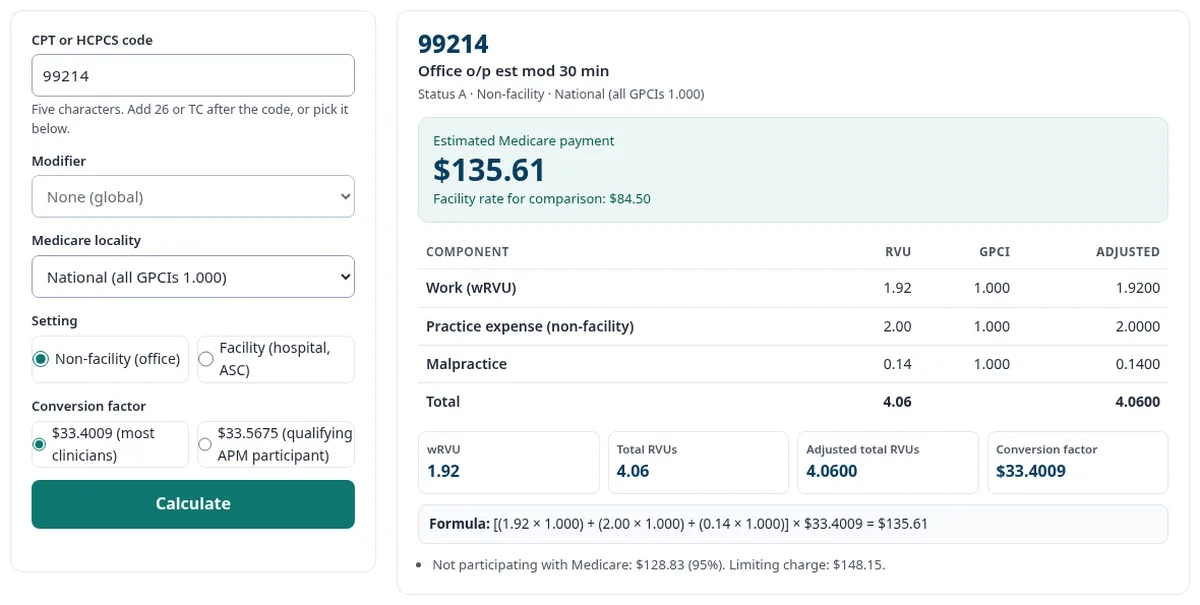
Enter a code and press Calculate. You will see the work, practice expense and malpractice RVUs, the GPCIs, the adjusted total and the estimated 2026 Medicare payment, with the formula.
Data: CMS CY 2026 PFS (file version RVU26D, released 08/26/2026). Estimate only. CPT codes and descriptions only are copyright 2026 American Medical Association. All rights reserved.
Key takeaways
- Every code has three RVUs: work, practice expense and malpractice.
- Medicare multiplies each RVU by its local GPCI, adds them up and multiplies by the conversion factor.
- The 2026 conversion factor is $33.4009 for most clinicians and $33.5675 for qualifying APM participants.
- The result is an estimate. Sequestration, modifiers and multiple procedure rules can lower the real payment.
What is an RVU?
An RVU is a relative value unit: the number Medicare gives a service to show the resources it takes. Every code on the physician fee schedule has three RVUs. Work covers the clinician’s time, skill and effort. Practice expense covers staff, space, equipment and supplies. Malpractice covers professional liability insurance. CMS publishes these values each year in its PFS relative value files.
RVUs are relative. A code with 4.06 total RVUs takes about twice the resources of a code with 2.06. The dollar amount comes later, when the conversion factor is applied.
How is an RVU calculated into a Medicare payment?
Medicare multiplies each RVU by the matching GPCI for your locality, adds the three results, and multiplies the total by the conversion factor. CMS states the formula in its 2026 relative value file.
Payment = [(Work RVU × Work GPCI) + (PE RVU × PE GPCI) + (MP RVU × MP GPCI)] × Conversion factor.
The calculator uses the non-facility practice expense RVU for office services and the facility PE RVU for hospital and ASC services. For example, 99213 has a work RVU of 1.30, a non-facility PE RVU of 1.46 and a malpractice RVU of 0.09. With national GPCIs of 1.000, that is 2.85 RVUs × $33.4009 = $95.19.
What is a wRVU?
A wRVU is the work RVU alone. It measures the clinician’s own effort, not overhead or insurance. Many employed physicians are paid on productivity, and wRVUs are the common yardstick. The calculator shows the wRVU for each code, so you can add up a day’s or a month’s work.
The wRVU does not change by locality. A 99214 carries 1.92 wRVUs in Alabama and in Manhattan. Only the payment changes, because the GPCI changes.
What is the 2026 Medicare conversion factor?
The conversion factor is the dollar value of one RVU. The 2026 Medicare physician fee schedule has two of them. Most clinicians are paid at $33.4009 per RVU. Qualifying participants in an advanced alternative payment model (APM) are paid at $33.5675. CMS set two factors for the first time in 2026, as the law requires. Both include a one-year 2.5% increase for 2026 only (CMS fact sheet).
The calculator defaults to $33.4009. Choose the higher factor only if the clinician is a qualifying APM participant for the year.
How does GPCI change Medicare payment?
A GPCI is a geographic practice cost index. It adjusts each RVU for local costs. Medicare has three GPCIs for each of its 109 payment localities, one for work, one for practice expense and one for malpractice. A GPCI above 1.000 raises payment, and a GPCI below 1.000 lowers it.
For 2026, the work GPCI has a floor of 1.000, extended through January 1, 2027, per the CMS GPCI file. Alaska has a work GPCI floor of 1.500, and frontier states have a practice expense floor of 1.000. One code can pay very differently by place: 99213 in the office is $87.79 in Alabama and $117.58 in San Francisco.
What is the difference between facility and non-facility RVUs?
The facility rate applies when the service is done in a hospital, ASC, emergency room or skilled nursing facility. The non-facility rate applies in all other settings, such as the office. The facility rate is usually lower, because the facility bills its own costs separately. CMS marks some codes “NA” when a setting is rarely or never used.
In payment posting, I check three things first when a Medicare allowed amount looks low: the locality, the place of service and the modifiers. One wrong place-of-service code can switch an office visit to the facility rate.
2026 RVU calculator examples: 99213, 99214 and 20610
These amounts use national GPCIs of 1.000 and the $33.4009 conversion factor. Pick your locality in the calculator to see your local rate.
| Code | CMS short descriptor | wRVU | Total RVUs (non-facility) | Total RVUs (facility) | National non-facility | National facility |
|---|---|---|---|---|---|---|
| 99213 | Office o/p est low 20 min | 1.30 | 2.85 | 1.72 | $95.19 | $57.45 |
| 99214 | Office o/p est mod 30 min | 1.92 | 4.06 | 2.53 | $135.61 | $84.50 |
| 20610 | Drain/inj joint/bursa w/o us | 0.77 | 2.06 | 1.19 | $68.81 | $39.75 |
Each figure matches the CMS 2026 relative value file and the CMS Physician Fee Schedule Look-Up Tool data for the same year.
What does this RVU calculator not include?
The calculator shows the fee schedule amount for one code, before claim-level rules. Treat it as an estimate. It does not apply these adjustments:
- Multiple procedure reductions (MPPR). A second surgery or imaging service on the same day is often paid at a lower rate. On the remittance this can show as CARC 59.
- Payment modifiers. Bilateral, assistant-at-surgery, co-surgeon and other modifiers change the amount. The calculator handles only 26, TC and 53, because CMS lists separate RVUs for them.
- Sequestration. Medicare cuts 2% from the final payment after the deductible and coinsurance (First Coast). It shows as CO-253.
- Deductible and coinsurance. The patient’s share is taken out of the allowed amount.
- Contractor-priced and non-covered codes. Codes with status C, N, B, X and others have no national payment. The calculator tells you the status instead.
The calculator does apply the imaging cap. For capped imaging services, CMS compares the fee schedule amount to an OPPS-based amount and pays the lower one. The calculator shows both. The gap between your charge and the allowed amount is a contractual write-off, often shown as CO-45.
How to use the RVU calculator
- Enter the code. Type a 5-character CPT or HCPCS code, such as 99214 or G0439. New to codes? Read what CPT codes are.
- Pick a modifier if offered. Imaging and other split codes list 26 and TC.
- Choose the Medicare locality. Leave “National” to match the national amounts on the CMS Look-Up Tool.
- Choose the setting and conversion factor. Then press Calculate.
Global days appear with the result. If a claim was paid wrong or denied, check the denial code library, then use the Appeal Letter Generator. See all our free medical billing tools.
How we tested this RVU calculator
We tested the calculator against 2 CMS data sets before we published it. All 9,526 code rows match the RVUs in the CMS Look-Up Tool data for 2026. We also tested it against the 6,322 capped imaging prices that CMS publishes by locality. Every one matched to the cent. The 2026 figures for 99213, 99214 and 20610 match a hand calculation from the RVU26D file.
Found a number that looks wrong? Contact us with the code and locality, and we will check it.
Frequently asked questions
Is this RVU calculator free?
Yes. It is free and needs no sign-up. The code you type stays in your browser. The tool downloads the CMS data file and does the math on your device, so nothing is sent or saved.
Where does the RVU data come from?
It comes from the CMS National Physician Fee Schedule Relative Value File, CY 2026 file version RVU26D, released 08/26/2026. Localities and GPCIs come from the GPCI file in the same CMS download. The conversion factors are $33.4009 and $33.5675, as CMS published them.
Why does my Medicare payment not match the calculator?
The calculator shows the fee schedule amount. Your remittance can be lower because of the 2%% sequestration cut, multiple procedure rules, payment modifiers, the deductible and coinsurance, or the imaging cap. Medicare Advantage plans pay by contract, so their rates can differ.
Can I use the RVU calculator for commercial payers?
Only as a reference. Commercial payers set their own rates. Some contracts are written as a percentage of the Medicare fee schedule. If yours is, multiply the result by that percentage.
Will RVUs change in 2027?
Yes. CMS issued the CY 2027 physician fee schedule final rule on November 4, 2026. It sets the 2027 conversion factors at $32.6286 (non-qualifying APM) and $32.9548 (qualifying APM), effective January 1, 2027. We will load the 2027 RVU file when CMS posts it.
What do modifiers 26 and TC mean in the calculator?
Modifier 26 is the professional component, the doctor’s reading and report. TC is the technical component, the equipment and staff. Codes that can be split show both options in the modifier list. The global code, with no modifier, pays both parts.
Sources
- CMS, PFS Relative Value File RVU26D (CY 2026, released 08/26/2026): RVUs, status codes, GPCIs, formula and limiting charge.
- CMS, CY 2026 Physician Fee Schedule final rule fact sheet (CMS-1832-F).
- CMS, Physician Fee Schedule Look-Up Tool.
- Federal Register, CY 2027 Physician Fee Schedule final rule (CMS-1848-F).
- First Coast Service Options (Medicare contractor), Federal sequestration payment reductions.