
These free medical billing tools help billers, coders and practice staff fix denials and check claims faster. Most people start with the Appeal Letter Generator. No sign-up, and nothing you type is saved or sent.
Start here: most-used tool
Appeal Letter Generator
Got a denial on a claim that was billed right? Pick the CARC code and the payer, add the claim details, and tick the arguments that fit. You get an editable appeal letter to copy, print or download as .docx. It covers more than 50 common denial codes, and Original Medicare claims get redetermination wording.
All free tools
- Appeal Letter Generator
Editable appeal for 50+ denial codes - Timely Filing Calculator
Claim, corrected claim and appeal deadlines - Denial Code Lookup
What a CARC or RARC means and the fix - NPI Lookup
Search the CMS NPI Registry - RVU Calculator
2026 Medicare RVUs and payment - Global Period Calculator
When a surgical global period ends - E/M Level Calculator
99202–99215 by MDM or time - NCCI Edit Checker
Can 2 codes be billed together? - MUE Lookup
Do the units pass the Medicare MUE? - Modifier 25 vs 59 Helper
25, 57, 59 or an X modifier - Patient Cost Estimator
What the patient owes vs the plan
Key takeaways
- Use the Appeal Letter Generator when a claim was right and the payer denied it.
- Use the Timely Filing Calculator to see how many days you have left to file or appeal.
- Use the Denial Code Lookup to learn what a CARC or RARC means and how to fix it.
- Use the RVU Calculator to see the 2026 Medicare RVUs and payment for a CPT code.
- Use the Global Period Calculator to see when the global surgery period for a CPT code ends.
- Use the E/M Level Calculator to pick an office visit code (99202–99215) by MDM or total time.
- Use the NCCI Edit Checker to see if 2 CPT or HCPCS codes can be billed together under Medicare PTP edits.
- Use the MUE Lookup to check if the units on a claim line exceed the Medicare MUE for a CPT or HCPCS code.
- Use the Modifier 25 vs 59 Helper to pick modifier 25, 57, 59, XE, XS, XP or XU with the CMS reason.
- Use the Patient Cost Estimator to work out what a patient owes and what the plan pays from the allowed amount.
Tools to Fix Claims and Denials
Quick, free helpers for billers, coders and patients. No sign-up.
Appeal Letter Generator
Pick a denial code and payer, fill in claim details, copy a ready-to-edit appeal letter.
Timely Filing Deadline Calculator
Enter the date of service or EOB date to see claim and appeal deadlines.
Denial Code Lookup
Search any CARC/RARC (e.g. CO-97, CO-16) for its meaning and fix steps.
NPI Lookup
Search the CMS NPI Registry by NPI or name and state. See type, taxonomy and address.
RVU Calculator
Enter a CPT code and locality to see work, PE and MP RVUs, GPCIs and the estimated Medicare payment.
Global Period Calculator
Enter a CPT code and surgery date to see the pre-op day, the end of the global period and modifiers.
E/M Level Calculator
Pick an office visit code (99202-99215) by MDM or total time, with 99417, G2212 and G2211 rules.
NCCI Edit Checker
Enter 2 CPT or HCPCS codes to see if a Medicare NCCI PTP edit applies, the column order and the modifier indicator.
MUE Lookup
Enter a CPT or HCPCS code and units to see the Medicare MUE value, the MAI and whether the units exceed it.
Modifier 25 vs 59 Helper
Answer a few questions to pick modifier 25, 57, 59, XE, XS, XP or XU, with the CMS reason for each.
Patient Cost Estimator
Enter the allowed amount, deductible, coinsurance or copay and out-of-pocket limit to see what the patient owes.
Appeal Letter Generator
Pick the CARC denial code and payer, add the claim details, tick the arguments that fit, and get an editable, professional appeal letter you can copy, download as .docx or print. It covers more than 50 common denial codes, including every code with a guide on this site. For Original Medicare claims it switches to redetermination wording, which must be filed within 120 days of receiving the notice (42 CFR 405.942).
Open the Appeal Letter Generator →
Timely Filing & Appeal Deadline Calculator
Enter the date of service or the denial date and the filing limit. You’ll see the exact claim, corrected claim or appeal deadline and how many days are left. You can also add a reminder to your calendar. Medicare’s 12-month claim limit (42 CFR 424.44) and 120-day appeal rule, with the 5-day mail presumption, are built in.
Open the Timely Filing & Appeal Deadline Calculator →
RVU Calculator
Enter a CPT or HCPCS code, pick a Medicare locality and the setting, and see the work, practice expense and malpractice RVUs, the GPCIs, the wRVU and the estimated Medicare payment, with the formula. It uses the CMS CY 2026 relative value file (RVU26D) and the 2026 conversion factor of $33.4009 (CMS PFS relative value files).
Global Period Calculator
Enter a CPT or HCPCS code and the date of surgery, and see the global days, the pre-op day, the last day of the global period and the days left. It also shows which modifiers apply and the 54/55/56 split. It uses the CMS CY 2026 relative value file (RVU26D) and the counting rules in the Medicare Claims Processing Manual, Ch. 12, §40.
Open the Global Period Calculator →
E/M Level Calculator
Pick the patient type, the problems, data and risk, or enter the total time. You’ll see the MDM level from the 2-of-3 rule, the code each method supports, the suggested office visit code (99202–99205, 99211–99215) and the 99417, G2212 and G2211 rules. It follows the AMA CPT E/M guidelines and the CMS E/M services booklet (MLN006764).
Open the E/M Level Calculator →
NCCI Edit Checker
Enter 2 CPT or HCPCS codes billed on the same day. You’ll see if a Medicare NCCI PTP edit applies, which code is column 1 and which is column 2, the modifier indicator (0 or 1), the edit rationale and the modifiers that can bypass it. It uses the CMS Q4 2026 practitioner PTP edit file (v323r0) from the CMS NCCI PTP edits page.
MUE Lookup
Enter a CPT or HCPCS code and the units billed for one patient on one day. You’ll see the Medicare practitioner MUE value, the MUE adjudication indicator (MAI), the MUE rationale and whether the units pass. It uses the CMS practitioner MUE table effective October 1, 2026, from the CMS MUE page.
Modifier 25 vs 59 Helper
Answer a few questions about an E/M visit or 2 bundled procedures. You’ll get a suggested modifier (25, 57, 59, XE, XS, XP, XU, an anatomic modifier or none) with the reasons from the 2026 NCCI Policy Manual and the CMS modifier 59 MLN booklet.
Open the Modifier 25 vs 59 Helper →
Patient Cost Estimator
Enter the allowed amount, the deductible left, the coinsurance or copay and the out-of-pocket limit left. You’ll see what the patient owes, what the plan pays and each step of the math, using the definitions in the HealthCare.gov glossary. It includes a Medicare Part B 2026 preset ($283 deductible, 20% coinsurance).
Open the Patient Cost Estimator →
Denial Code Lookup
Search CARC and RARC codes for the official X12 wording, what each code means in plain English, and how to fix it. X12 maintains the official lists, which change over time, so check the current X12 CARC list for new or retired codes.
Most-searched denial codes
Each link opens a full guide with the official meaning, the usual causes and a step-by-step fix. The plain-English summaries below paraphrase the X12 code descriptions.
| Code | What it means | Usual first step |
|---|---|---|
| CO-16 | The claim lacks information or has a billing error | Read the remark code, fix the field and resubmit |
| CO-45 | The charge is above the fee schedule or contracted rate | Usually a contractual write-off; check the allowed amount |
| CO-50 | Not deemed medically necessary by the payer | Compare the record to the payer policy, then appeal |
| CO-97 | Included in the payment for another service | Check NCCI edits and modifier use |
| CO-29 | The time limit for filing has expired | Find proof of timely filing, such as the 277CA |
| CO-197 | Precertification or authorization was absent | Look for an auth on file or a retro-auth option |
| CO-4 | The procedure code doesn’t match the modifier | Correct the modifier and send a corrected claim |
| CO-11 | The diagnosis doesn’t match the procedure | Check diagnosis pointers and coding |
| CO-22 | Another payer may be primary | Verify coordination of benefits with the patient |
| OA-18 | Exact duplicate claim or service | Check claim status before you resubmit |
| CO-27 | Service was after coverage ended | Re-verify eligibility and find other coverage |
| CO-109 | Not covered by this payer; send to the correct one | Identify the right payer or contractor |
| PR-1, PR-2, PR-3 | Deductible, coinsurance and copay amounts | Bill the patient or the secondary payer |
For the full list, see the denial code library or the CARC and RARC guide.
How to read a denial code
Every denial on an 835 remittance or paper EOB combines up to three codes. CMS explains the 835 format on its payment and remittance advice page. Reading all three tells you who owns the balance and what to do next.
- A group code is the two-letter prefix that says who is responsible for the adjustment: CO (contractual obligation), PR (patient responsibility), OA (other adjustment) or PI (payer-initiated reduction). X12 maintains the group code list.
- A CARC is a Claim Adjustment Reason Code. It explains why the claim or line was paid differently than billed. See the official CARC list.
- A RARC is a Remittance Advice Remark Code. It adds detail, such as which document is missing or which policy applied. See the official RARC list.
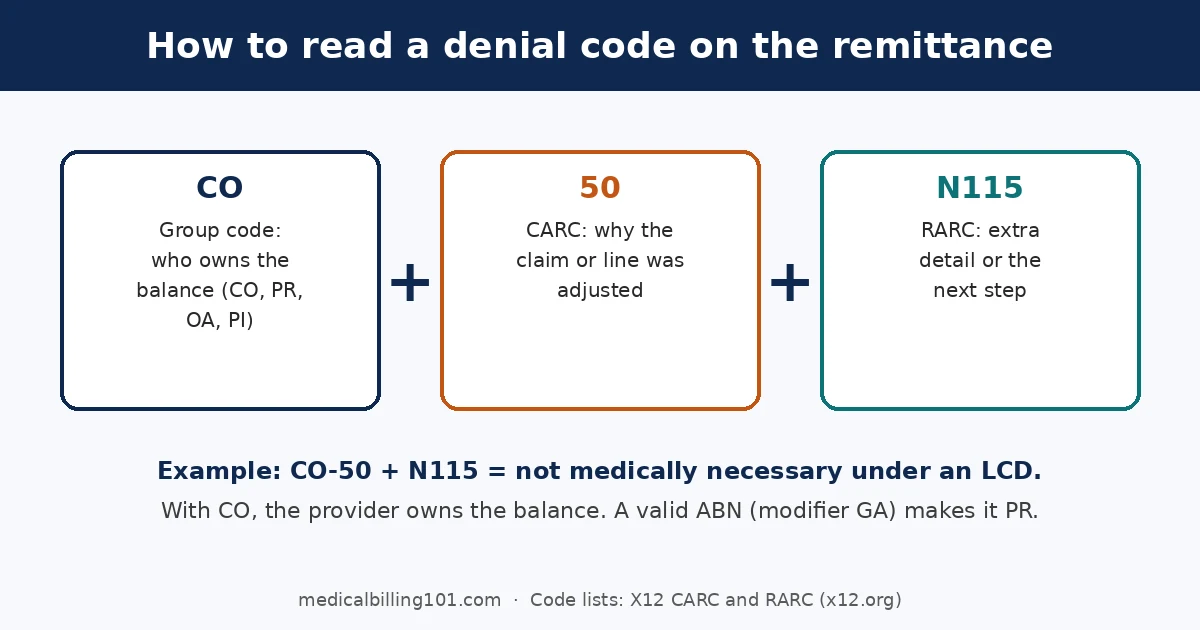
For example, CO-50 with remark N115 means the payer found the service not medically necessary, and the decision was based on a Local Coverage Determination. The CO group means the provider carries the balance, so the patient can’t be billed. On a Medicare claim, a valid ABN billed with modifier GA would have shifted it to PR. The rules on when a patient knew a service might not be paid are in 42 CFR 411.404.
Which tool to use for which job
| Task | Tool | What you get |
|---|---|---|
| Write a payer appeal for a denied claim | Appeal Letter Generator | An editable letter, an enclosure list and a .docx download |
| Check a claim, corrected claim or appeal deadline | Timely Filing Calculator | The exact deadline, days left and a calendar reminder |
| Check RVUs and the Medicare rate for a CPT code | RVU Calculator | Work, PE and MP RVUs, GPCIs, wRVU and the estimated payment |
| Check if a visit falls in a global surgery period | Global Period Calculator | Global days, pre-op day, end date, days left and modifiers |
| Pick the level for an office visit | E/M Level Calculator | MDM level, code by time, suggested code and add-on rules |
| Check if 2 codes can be billed together | NCCI Edit Checker | Column 1 and 2, modifier indicator and edit rationale |
| Check units against the Medicare MUE | MUE Lookup | MUE value, MAI and rationale |
| Pick modifier 25, 59 or an X modifier | Modifier 25 vs 59 Helper | Suggested modifier with CMS reasons |
| Estimate what a patient owes | Patient Cost Estimator | Patient share and plan payment with steps |
| Understand a CARC or RARC on a remittance | Denial Code Lookup | Official wording, causes and a step-by-step fix |
These tools are built and maintained by Manikandan J, CPC, CRCR. Read about the author, our editorial policy, or contact us to report an error.